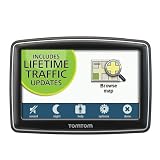
I like this product. My basis of comparison is my old $600 Magellan GPS, which has died a long, slow, and infuriating (for me) death. I took a gamble buying this new Tom Tom without any user reviews to go on. It has nice looking graphics, starts up very quickly, and is light and thin, with a nicely sized display. It is able to pick up a traffic signal in locations where my Magellan didn't, indicating a superior traffic receiver operating successfully in weak signal areas. The graphics used to show traffic problems along your route seems very nice. When the car is changing heading, the map slews around quickly.
Connecting the device to my computer using the included UBS cable, I was able to ascertain available updates to the program and the map data (kind of odd for these to exist so soon since the product has just now been released), and get them downloaded and installed successfully, although the process online is not especially intuitive. The online system also has a very nice backup feature, that can hold an image of your entire system for you, but it takes a very long time, seemingly an hour or more (I didn't time it) to complete.
I'm red-green color blind and have a lot of trouble with existing color schemes in all kind of systems that can't be customized (somehow everyone thinks it's okay to discriminate against color blind people while going to great lengths and expense to accommodate people with physical limitations). Tom Tom has a process that allows users to contribute their own color schemes for the graphics, and I have found some that I can see better. I like this very much.
Some limitations:
The user interface is not especially intuitive and takes some experience to get used to.
When you enter an address on the onscreen keyboard, there is no audible feedback that you have entered each keystroke, only visual on the screen.
When I first got the device, after turning it on for the first time and viewing the canned intro presentation, for several subsequent uses (turned off power, turned it back on again) the device spontaneously put me back into sections of the intro presentation, making me get ready to take it back for a refund. Something made me hold the power button in while powering it down, then powered it back up, and the problem disappeared.
The graphics are a little hard to read in strong direct sunlight, but not terribly bad.
The POI data base is missing some establishments that it really should know about, and has at least one location nearby (a gas station) that has been out of business for at least five years.
When you complete a trip and the system acknowledges that you have reached your destination, it doesn't nullify the trip automatically like my Magellan did, but retains it until you do so yourself manually. If you start out again, retracing your path, it will still show that path as a route, with (now) backward-facing arrows. This goes away when you cancel the route.
Points of Interest icons on the map do not allow you to tap them to get information on their identity, address, and phone numbers, like my Magellan had. I miss this feature.
Although the product has been released for sale, they haven't posted the user's manual online yet, according to the technical advisor I was able to reach. I liked that I was able to get someone on the phone, though, fairly quickly, when I called, he spoke good English with an American accent, didn't mumble or scoff at my questions, but did seem kind of impatient.
These are just my initial impressions, having used the system for only a few days.Get more detail about TomTom XXL 550T 5-Inch Widescreen Portable GPS Navigator (Lifetime Traffic Edition).


No comments:
Post a Comment